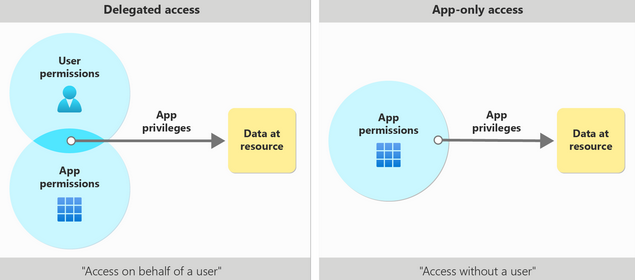
In my previous post, we saw how app registrations add identity configurations for applications on Azure AD. Just like a user, an application would also require access to resources like Microsoft Graph, which need authorization. The resource owner can grant(consent) or deny this authorization to the application.
There are mainly 2 access scenarios:
Delegated access - access on behalf of a signed-in user.
User is signed-into a client application, which access the resource on behalf of the user. This requires delegated permissions (also referred to as scopes). All scenarios involving user actions should use delegated access. Also, scopes should be limited using the principle of least-privilege. See also: the full list of Microsoft Graph permissions
App-only access - access without a user, as the application’s own identity. This scenario is when the application runs as a background service or daemon used for automation or backup, or the data can’t be scoped to a single user. The client app needs to be granted appropriate application roles of the resource app it’s calling to access the requested data. Application roles granted through consent are called application permissions.
Consent is the process by which admins or users authorize an application to access a protected resource. e.g. during an application sign-in for the first time, a user may see a consent prompt with the list of permissions that the client app is requesting (e.g. ability to see the user’s profile or access the user’s calendar).
Granting consent can happen in 3 ways:
For some time now, I’ve been working on security risk assessments of web applications. Modern identity management can be complex and often requires diving deep into the authentication flow and registration process to understand risk blocks in order to design appropriate controls and counter-measures. I hope to write a short series of posts to document the components and flows of this process, so that it can be my handy reference.
In my post on Identity and Access Management (IAM), I provided a very high-level view of how modern authentication works on the basis of a centralized Identity provider, like Azure Active Directory.
In this post, let’s look at a Microsoft Azure video, where Azure AD Program manager Stuart Kwan presents the basics of modern claims-based authentication in a lucid and eloquent way.
Clearly if a picture is worth a thousand words, a video is probably worth a million!
Endpoints are a critical aspect of securing your resources in the cloud. When using Azure PaaS services, it is important to understand the differences between two types of endpoint available in Azure: service endpoint and private endpoint.
Service endpoint:
A service endpoint is a way of extending your virtual network’s private address space to Azure services over the Azure backbone network. When a service endpoint is enabled, traffic between your virtual network and the Azure service of your choice stays on the Azure backbone network, rather than going over the public internet. This provides better security and performance for your resources.
Identity and Access Management (IAM) is a framework of policies and technologies to ensure the right people or machines to access the right assets or resources.
Identity:
In this digital age, an identity can be either a human (user), a software component (application) or a hardware component (computer, mobile or IoT device). Just like any identity document in the real-world, identities serve is a way to authenticate and authorize access to assets and resources.